
DOCX to HTML
Documents
Convert DOCX to HTML directly in the browser without uploading your file or creating an account.
DOCX
HTML
Runs locally in your browser
A fast, private converter. No account, no upload queue.
JPG to PNG
Most used
The conversions people need most often, ready in one click.
Documents
Convert DOCX to HTML directly in the browser without uploading your file or creating an account.
Documents
Convert DOCX to PDF directly in the browser without uploading your file or creating an account.
Documents
Convert DOCX to TXT directly in the browser without uploading your file or creating an account.
Documents
Convert HTML, HTM to TXT directly in the browser without uploading your file or creating an account.
Documents
Convert MD, MARKDOWN to HTML directly in the browser without uploading your file or creating an account.
Documents
Convert PDF to TXT directly in the browser without uploading your file or creating an account.
Documents
Convert TXT to HTML directly in the browser without uploading your file or creating an account.
Documents
Convert TXT to PDF directly in the browser without uploading your file or creating an account.
Browse
Categories covering documents, media, data, engineering and research formats. Each one holds the tools that work with that kind of file.
Image conversion, editing, privacy and web graphics
Inside this category
Favicon Generator Image Background Remover Image Crop +28 more
Create, combine, split and export PDF documents
Inside this category
Compress PDF Extract PDF Pages Images to PDF +15 more
Word processing, text, markup and LaTeX formats
Inside this category
DOCX to HTML DOCX to PDF DOCX to TXT +44 more
Re-encode, extract and normalise audio
Remux, re-encode and extract from video files
Tabular data interchange and workbook conversion
Inside this category
CSV Cleaner CSV Column Extractor CSV Formatter +13 more
Slide deck conversion and export
EPUB, MOBI and reading formats
Inside this category
EPUB Metadata Viewer EPUB to PDF PDF to EPUB
Compress, extract and repackage bundles
Inside this category
Create ZIP Extract ZIP ZIP File Viewer +1 more
Engineering drawings and 3D model exchange
Inside this category
GLTF to GLB GLB to GLTF
Validate, format, and convert structured data
Inside this category
CSV to JSON JSON Formatter JSON Minifier +8 more
Timing formats for captions and transcripts
Inside this category
SRT to VTT VTT to SRT SRT to TXT
Scalable artwork and drawing formats
Inside this category
SVG Minifier SVG Optimizer SVG to JPG +2 more
Geospatial data and map layers
Inside this category
GeoJSON Formatter GeoJSON Validator GeoJSON to KML +2 more
Research data, tables and instrument output
Inside this category
SI Unit Converter Scientific Notation Significant Figures +7 more
Format HTML, CSS, JavaScript, TypeScript, SQL and more
Inside this category
HTML Formatter HTML Minifier CSS Formatter +11 more
Encode, decode and normalise text — character encodings, base64, URLs, Unicode, line endings, timestamps and time zones.
Inside this category
Text Encoding Converter UTF-8 Converter ASCII Converter +28 more
Turn contacts (vCard) and calendars (iCalendar) into CSV or JSON, entirely in your browser.
Inside this category
VCF to CSV CSV to VCF VCF to JSON +3 more
Focused encoders and decoders — Base64 and hexadecimal for text, files and binary data.
Inside this category
Text to Base64 Base64 to Text File to Base64 +3 more
Hashes, HMAC, tokens, UUIDs, QR codes and developer utilities
Inside this category
SHA-1 Hash SHA-256 Hash SHA-512 Hash +12 more
Unit, temperature, base, date, BMI, loan and tip calculators
Inside this category
Unit Converter Speed Converter Data Size Converter +9 more
Why this one
Built around the way people actually convert files: quickly, occasionally, and without wanting to hand over an email address.
Supported tools process files directly on your device, so nothing has to be uploaded to a server to be converted.
Every tool on the site is free, with no credits, no daily quotas and no paywall hiding behind a spinner.
No sign-up, no email address, no dashboard. Open a tool, drop a file and get on with your day.
The interface is designed around one job: pick a file, choose an output format, download the result.
Three steps
Three steps, and the middle one happens on your own device.
Drag a file onto the drop area or browse your device. The tool checks the file type and size before anything else happens.
Confirm the output format and adjust the settings that matter, such as image quality, page range or audio bitrate.
Processing runs locally in a worker so the interface stays responsive. When it finishes, the file is ready to save.
For supported tools, files can be processed directly in your browser, so they do not need to be uploaded to our servers. That is an architectural choice, not a slogan: there is no upload step to forget about later.
Processed on your device
For supported tools the file is read with the browser File API and never leaves your computer. There is no upload step to wait for.
No accounts, no profiles
We do not ask for an email address, and there is no user database to connect your files to.
Nothing stored
Files are held in memory for the duration of the conversion and released as soon as you close or reset the tool.
Honest about limits
Some formats need codecs that browsers do not ship. The tool page tells you plainly what runs locally and what is still being built.
Learn
Practical explanations of formats, quality and browser processing.
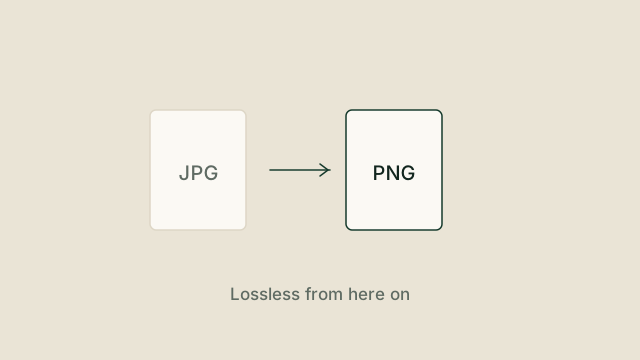
PNG is lossless and JPG is not, which creates a common misunderstanding about what a conversion can and cannot fix. Here is what actually happens to your pixels.
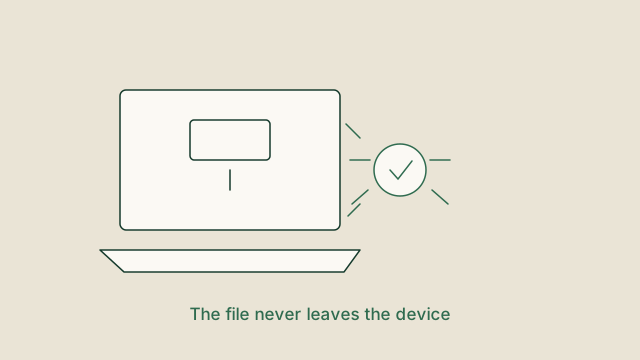
Uploading a document to a converter means trusting a stranger's server. Here is how to tell which conversion sites really process locally, and which ones only say they do.
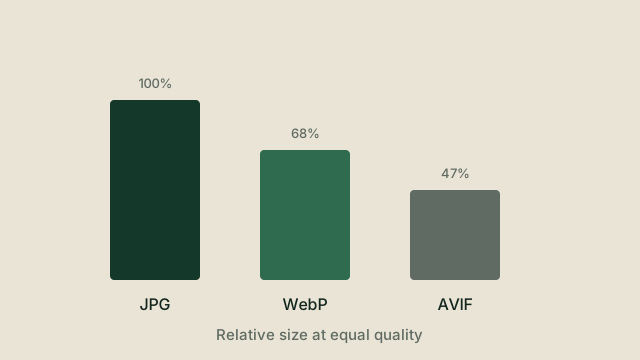
A practical comparison of the three image formats that matter for the web, with guidance on which one to pick and when converting is worth it.
Answers
The questions we get asked most, answered directly.
Yes. Every converter on the site is free to use, with no subscription, credit system or premium tier.
No. There is no sign-up, no login and no dashboard. Open a tool and use it straight away.
For supported tools, no. The file is processed by your browser on your own device. Tools that are still being built say so clearly on the page instead of pretending to convert.
The directory covers images, PDF, documents, spreadsheets, presentations, audio, video, data, eBooks, archives, CAD and 3D, fonts, subtitles, vector, GIS and scientific formats. Each tool page lists the exact input and output formats it accepts.
That depends on your device rather than on a server limit. Because conversion happens locally, the ceiling is your available memory. Very large video and document files are the most demanding, and the tool warns you before starting when a file looks heavy.
Yes. The interface is built mobile first and tested from 320 px upwards, so the drop area, format picker and download button all work on a phone.
Once a page and its converter engine have loaded, many conversions keep working without a connection because processing happens locally. A first visit still needs the network to load the page itself.
Fast operations such as image format changes finish almost instantly. Re-encoding audio or video is genuinely CPU intensive and takes as long as your device needs, with progress reported throughout.
240 tools, 21 categories and 37 formats — all free, all without an account.
Tell us what happened and we will look into it. Name, email address and a short message is all it takes — there is no account, and no file to attach. Requests are also how the catalogue grows: ask for a format and it gets considered for the next batch of tools.