
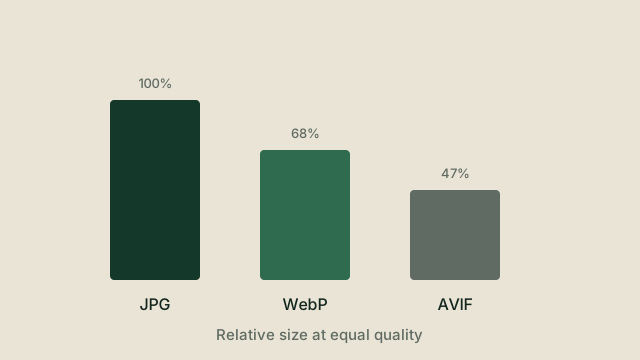
Three formats cover almost every web image today. They are not competitors so much as tools with different trade-offs.
JPG
The universal fallback. Every browser, every editor, every printer understands it. It is lossy, it has no alpha channel, and it is showing its age on sharp edges and flat colour, but it still wins on compatibility.
WebP
Roughly 25 to 35 percent smaller than an equivalent JPG at similar quality, with support for transparency. Support is now effectively universal in current browsers. For most websites, WebP is the sensible default upgrade.
AVIF
Compresses better still, often by another 20 to 30 percent over WebP, and handles wide colour gamuts. It is slower to encode, which matters when you are converting on a laptop rather than a build server, and support in older software is thinner.
A simple decision path
- Start with WebP. It is the best balance of size, quality and support.
- Use AVIF when file size is the priority and you can accept slower encoding.
- Keep JPG when something downstream cannot read anything newer.
What about converting in the other direction?
Going from WebP or AVIF back to JPG is common when a tool refuses the modern formats. Expect a size increase and a small quality loss, because you are moving from a more efficient encoder to a less efficient one.
Try it yourself
The tools mentioned in this article are free and need no account. Supported tools process files on your device.
DOCX to HTML
Documents
Convert DOCX to HTML directly in the browser without uploading your file or creating an account.
DOCX to PDF
Documents
Convert DOCX to PDF directly in the browser without uploading your file or creating an account.
DOCX to TXT
Documents
Convert DOCX to TXT directly in the browser without uploading your file or creating an account.
HTML to TXT
Documents
Convert HTML, HTM to TXT directly in the browser without uploading your file or creating an account.